Check a LegitPepCheck badge
Verified businesses can show our badge on their own website. Every badge is drawn live from the business's current status and links to its profile, so the profile is always the source of truth.
Check a badge
Tip: right-click the badge on a website and copy the image address, then paste it here.
What the badge shows
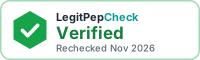
- Verified with the month of the last full recheck: the business passed our document review and its verification is current.
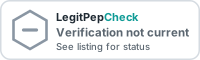
- Verification not current, see listing: the verification lapsed or was revoked, or the business was never verified. Click through to the profile for its status.
How to tell a real badge
- Clicking it opens the business's profile on LegitPepCheck, with the same name and website.
- The image loads from LegitPepCheck, not from the business's own server. A copied image file proves nothing; paste the image address above.
- If verification lapses, every copy of the badge changes on its own within a day. Nothing has to be removed by hand.
Verification covers business records and documents, not product testing or medical care. What verification checks.
For verified businesses
Your embed code is in your dashboard, with light and dark versions in three sizes. It is a plain link and image, no scripts. How the badge works for businesses.